GolfLogix Golf GPS + 3D Putts
- 2.2
- Rating
- 1.00M
- Installs
- Free
- Price

 Analysis by App-foxy
GolfLogix Golf GPS + 3D Putts is the kind of sports app I would install before a casual round when I want more course information than a basic scorecard provides. It combines GPS guidance, scoring tools, 3D course views, and putting-oriented features in one place, but my experience is that its value depends heavily on a careful setup and a realistic understanding of what a phone can do on a golf course. It is useful, but it is not completely friction-free.
The app is free to download, which makes it easy to test without committing money at the start. It is developed by GolfLogix Golf GPS and is rated for Everyone, so it is approachable for a wide range of golfers. At the same time, optional purchases range from $0.99 to $59.99 per item, meaning I would check which tools are available without payment before planning to rely on a particular feature.
Getting past the first frustrating moments
The first place I expect many golfers to get stuck is before the first tee. A GPS golf app needs a clear view of the sky, a usable phone battery, and enough time to prepare. If I open it in the car park, rush through every prompt, and walk straight to the tee, I am more likely to blame the app when the real problem is incomplete preparation.
You May Also Like

 Blood Strike: 2.5 Anniversary
Blood Strike’s Loadouts Turn Every Drop Into a Tactical Gamble
A close look at Blood Strike’s custom loadouts: how fast access to signature weapons reshapes its battle royale rhythm, rewards preparation, and narrows the gap between fights.

 Pandora - Music & Podcasts
Pandora’s Music Is Easy to Start, but Harder to Recover
Pandora’s strength is its low-effort path from a seed to a station. Its weak spot is how much confidence it asks you to place in connection, setup, and quiet recovery.

 8 Ball Pool
 Is Built on Rivalries, Rematches, and Routine
A close look at the rivalries, rematches, shared routines, and unanswered safety questions that turn a quick pool match into a persistent mobile community.

 Samsung Music
’s Quiet Strength Is Playing What You Already Own
Its reach comes less from spectacle than from dependable access to a personal library. That simplicity is both the app’s strongest retention engine and its ceiling.

 AccuWeather: Weather Radar
AccuWeather Review: A Quick, Clear Forecast for Everyday Decisions
For everyday plans, the best forecast is the one you can understand quickly. AccuWeather makes rain timing, radar, and local conditions easy to act on, with a few trade-offs.

 Hill Climb Racing
Why Hill Climb Racing Still Turns Crashes Into One More Run
A tiny car, a bumpy hill and one more upgrade: Hill Climb Racing keeps resurfacing because its simple chaos makes every near-miss feel personal.
More From Our News Desk



I would begin by opening GolfLogix Golf GPS somewhere with a reasonably open view rather than under a roof or beside tall buildings. I would also make sure the phone has enough charge for the round and that the app is running the current version, listed as 10.0.7. These are simple checks, but they matter more here than they do with an ordinary scorekeeping app because location tools have to keep working while I move around the course.
The app supports Android devices running Android 6.0 or later. That is a broad compatibility range, but compatibility alone does not guarantee a smooth experience on every older phone. A phone can meet the minimum operating-system requirement and still struggle with battery health, storage pressure, background restrictions, or a weak location sensor. If the screen freezes or location updates arrive slowly, I would first restart the phone and close unrelated apps rather than immediately assuming the course information is wrong.
Another common sticking point is choosing the right course. Golfers often play at facilities with similar names, multiple layouts, or more than one set of tees. I would slow down during course selection and check the displayed name before beginning the round. Selecting a nearby but incorrect course can make every later distance look suspicious, even though the GPS itself is functioning normally.
The most useful setup habit is to verify the course before the first shot, not after a distance looks wrong. Once I am standing on the opening tee, it is much harder to distinguish a course-selection mistake from a positioning issue. A quick check while I still have time saves repeated confusion during play.
What I would check before trusting a yardage
I would treat the first few readings as orientation rather than absolute truth. GPS guidance is helpful for planning, but it is not a replacement for reading the hole, checking hazards visually, or considering the lie. Trees, slopes, wind, and the actual landing area still matter. The app can help me understand the course layout; it cannot make the club decision for me.
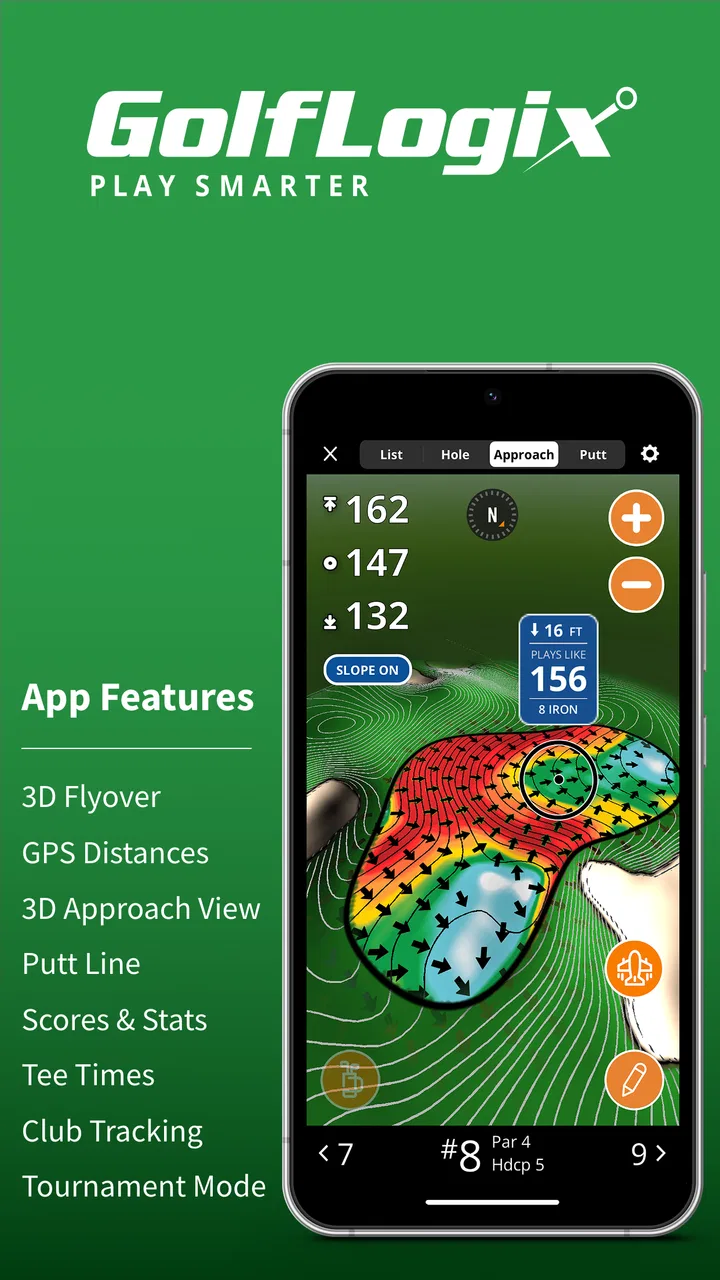
The 3D presentation is particularly useful before playing an unfamiliar hole. I can use a visual flyover-style view to understand the general shape of the hole and identify how the fairway, green, and hazards relate to one another. I find this more valuable as a planning tool than as something to stare at during the round. Looking at it before teeing off helps me choose a sensible target, while trying to study a detailed view in the middle of a busy round can slow everything down.
For putting, I would be careful not to confuse a visual aid with a guarantee. A 3D putting feature can make the green easier to think about, especially when I am unsure how a surface appears to break, but my read still depends on the ball, the grass, the pace, and my position. The practical advantage is that it encourages me to inspect the putt before swinging rather than treating every green as flat.
One small workflow improvement is to decide in advance how much information I actually want. If I only need a quick distance and a score entry, I would keep the round simple. If I am playing a new course, I would spend more time with the visual tools before the hole begins. This prevents the app from becoming a distraction and makes its more advanced features work for me instead of against me.
Recovering when a round does not go smoothly
If the location marker appears slow or inaccurate, I would first stop moving for a moment and give the phone a chance to settle. Walking while the position is updating can make the display seem more erratic than it really is. I would also check that the phone is not buried in a pocket or enclosed in a place where the signal has difficulty reaching the sky.
If the app seems stuck, my recovery sequence would be straightforward: return to the main screen, reopen the relevant round or course, and restart the app if necessary. I would avoid repeatedly tapping every control at once, because that makes it difficult to tell whether the problem is temporary loading, a missed selection, or a genuine error. A calm restart is usually more useful than changing several settings without knowing what each change affects.
Scorekeeping deserves its own recovery plan. I would enter the score at a natural pause, such as after leaving the green or before moving to the next tee, rather than waiting until several holes have passed. That creates a regular checkpoint. If I do make a mistake, correcting it immediately is much easier than reconstructing an entire round from memory.
This is also where the app’s all-in-one design can help. Having GPS guidance, scoring, and visual course information together means I do not need to switch constantly between separate tools. The trade-off is that a problem in one part can make the whole experience feel unreliable. If the score screen is behaving normally but the map is slow, I would continue using the score function and treat the GPS issue separately instead of abandoning the round.
Before a competitive or important round, I would test the exact workflow I plan to use during a relaxed practice session. I would open a course, inspect a hole, record a sample score, and try the putting view. This is a better test than simply installing the app and assuming I will understand it under pressure. It also gives me a chance to decide whether the free experience is sufficient or whether an optional purchase is worth considering for my style of play.
When the app is not actually the problem
Golf courses are difficult environments for any phone-based GPS tool. The phone may be in a low-power state, the battery may be aging, the device may be overheating in direct sun, or the player may be moving between open and obstructed areas. These conditions can produce delays that are not caused by the app’s course content.
Battery behavior is especially important. A long round with the screen frequently on can consume much more power than a short test at home. I would begin with a well-charged phone, reduce unnecessary background activity, and avoid leaving the display active when I am not checking a hole. Carrying a small power bank can be sensible for a golfer who plays often, although I would keep it protected from moisture and avoid letting cables interfere with the swing or walking routine.
Weather and visibility can also change how practical the app feels. Bright sunlight may make a phone screen harder to read, while rain encourages me to minimize handling the device. In those conditions, I would use the app before the shot, then put the phone away and focus on the physical course. A digital aid is most useful when it reduces uncertainty, not when it creates another object to manage.
There is also a human factor. If I am already playing slowly, checking every view, recording every detail, and repeatedly reviewing the same distance, the app can add to the delay. GolfLogix Golf GPS is better suited to a deliberate but efficient routine: check the hole, make a decision, play, and record the result. Golfers who want a completely hands-off experience may prefer a dedicated golf watch or a simpler GPS tool.
Compared with a paper scorecard, this app offers more context and less manual calculation, but it requires a charged phone and some preparation. Compared with a basic distance-only golf app, it aims to provide a broader experience through course visuals, scoring, and putting-related guidance. Compared with dedicated hardware, it is cheaper to try and more flexible, but a phone can be less convenient to handle and more vulnerable to battery or screen problems.
Who will get the most from it
I think the app is a good fit for golfers who play different courses, enjoy seeing the hole layout before choosing a shot, and want scoring alongside GPS support. It is also useful for someone learning to plan rather than simply hitting toward the flag. The 3D views can encourage better course management because they make me think about the shape of a hole and the position of hazards before I commit to a club.
A casual golfer can use it without becoming deeply technical. I would start with the basic distance and scoring workflow, then add the visual and putting tools only when they solve a real problem. That gradual approach keeps the app approachable and makes it easier to judge whether the optional purchases offer enough value for me.
It may be a poor choice for someone who dislikes using a phone during golf, needs a device that works without frequent interaction, or expects professional-level precision from a consumer GPS experience. It is also not ideal for a player who wants only a minimal scorecard and finds maps, flyovers, or putting views unnecessary. In that case, a simpler alternative would probably feel cleaner.
The public response is mixed: the app has an average rating of 2.2 from around 12 thousand ratings, alongside roughly 3.6 thousand written reviews. I would not treat those figures as a complete verdict, but they do reinforce my advice to test the basic workflow before paying for extras. The app has passed one million installs, so it is clearly used by a substantial number of golfers, yet popularity does not remove the need to check how it behaves on a particular phone and course.
My practical verdict after using the full workflow
GolfLogix Golf GPS + 3D Putts is most convincing when I use it as a planning companion rather than an automatic caddie. Its combination of GPS information, visual course views, scoring, and putting support gives it more range than a plain scorecard. I especially like the idea of reviewing an unfamiliar hole before stepping onto the tee, then keeping the actual shot routine short and focused.
The main weakness is the amount of responsibility placed on the user. I need to select the correct course, prepare the phone, manage battery use, and recover sensibly if location updates slow down. That is not unusual for a phone-based sports app, but it means the experience can feel disappointing when I expect instant, flawless guidance without preparation.
For an everyday example, imagine I am playing a new course after work with a friend. Before the opening shot, I would use the course view to understand the hole, check the GPS information, and put the phone away. After the hole, I would enter the score while the details are fresh. On a later hole, I might use the putting view to think through an unfamiliar green, but I would still confirm the slope and pace with my eyes. That routine gives me the benefits without letting the app dominate the round.
The free entry point makes it reasonable to try, while the in-app purchase range means I would make any upgrade decision only after using the features I actually need. With its Everyone content rating, broad Android support from version 6.0 onward, and a long presence since its release on May 19, 2010, it is an established option rather than a brand-new experiment. My recommendation is cautious but positive: try it if you want several golf tools in one app, prepare properly, and choose a simpler or dedicated alternative if convenience matters more than having GPS, 3D views, scoring, and putting assistance together.
FAQs for GolfLogix Golf GPS + 3D Putts
01What is GolfLogix Golf GPS + 3D Putts, and what does it offer?
GolfLogix Golf GPS + 3D Putts is a golf companion app designed to help players plan and manage their rounds. It provides GPS distances to important points on the course, digital scorekeeping, course information, and putting tools that use 3D-style green views. The app is aimed at golfers who want more information during play without carrying a separate rangefinder or notebook.
02Does GolfLogix Golf GPS + 3D Putts work on every golf course?
The app includes a large database of golf courses, but coverage and the level of available detail can vary depending on location. Before relying on it for an important round, it is sensible to search for your home course or the course you plan to visit. GPS accuracy may also be affected by phone settings, satellite reception, terrain, weather, and whether the device has a clear view of the sky.
03Is GolfLogix Golf GPS + 3D Putts free to download and use?
GolfLogix can generally be downloaded without an upfront purchase, but some of its more advanced features may require a subscription or in-app purchase. Depending on the current plan, premium tools can include enhanced green-reading information, detailed course views, or additional performance features. Check the app-store listing and subscription screen carefully, especially for trial periods and automatic renewal terms.
04Can I use GolfLogix during a tournament or official round?
Whether you can use GolfLogix in competition depends on the rules of the event and the specific features you use. Basic distance information may be permitted under certain rules, while slope calculations, wind assistance, club recommendations, or other advanced guidance can be restricted. Always confirm the local rules with the tournament organizer, and disable any prohibited features before starting play.
05Does GolfLogix Golf GPS + 3D Putts require an internet connection?
The app may need an internet connection to download course data, sign in, synchronize scores, update maps, and access subscription features. GPS positioning itself can work outdoors without mobile data once the necessary information is available, but offline performance is not something to assume for every course or tool. Download or open the course in advance and keep your phone charged before playing.
Pros
- Accurate GPS distances to greens
- hazards
- and layup points
- 3D putting views help visualize slopes and improve green-reading
- Large database of courses supports golfers in many locations
- Shot tracking and scoring tools make round analysis more useful
- Works with Apple Watch for convenient on-course distance checks
Cons
- Many advanced features require a paid Premium subscription
- Course maps may occasionally need updates or corrections
- GPS use can noticeably reduce battery life during a full round
- The interface may feel crowded for golfers who prefer simple tools
- Some features require a stable internet connection before playing

GolfLogix Golf GPS + 3D Putts
Gallery